| Field | Value |
|---|---|
| Project | Project 1.5: VM-to-Kubernetes Migration Platform |
| Stage | 1B |
| Date | 2026-09-27 |
| Result | All gates B1 to B10 PASS. Nested KVM classified KVM accelerated (functional, high exit cost) |
| Detail documents | kvm-learning-lab.md (the VM), nested-kvm-feasibility.md (the nested test) |
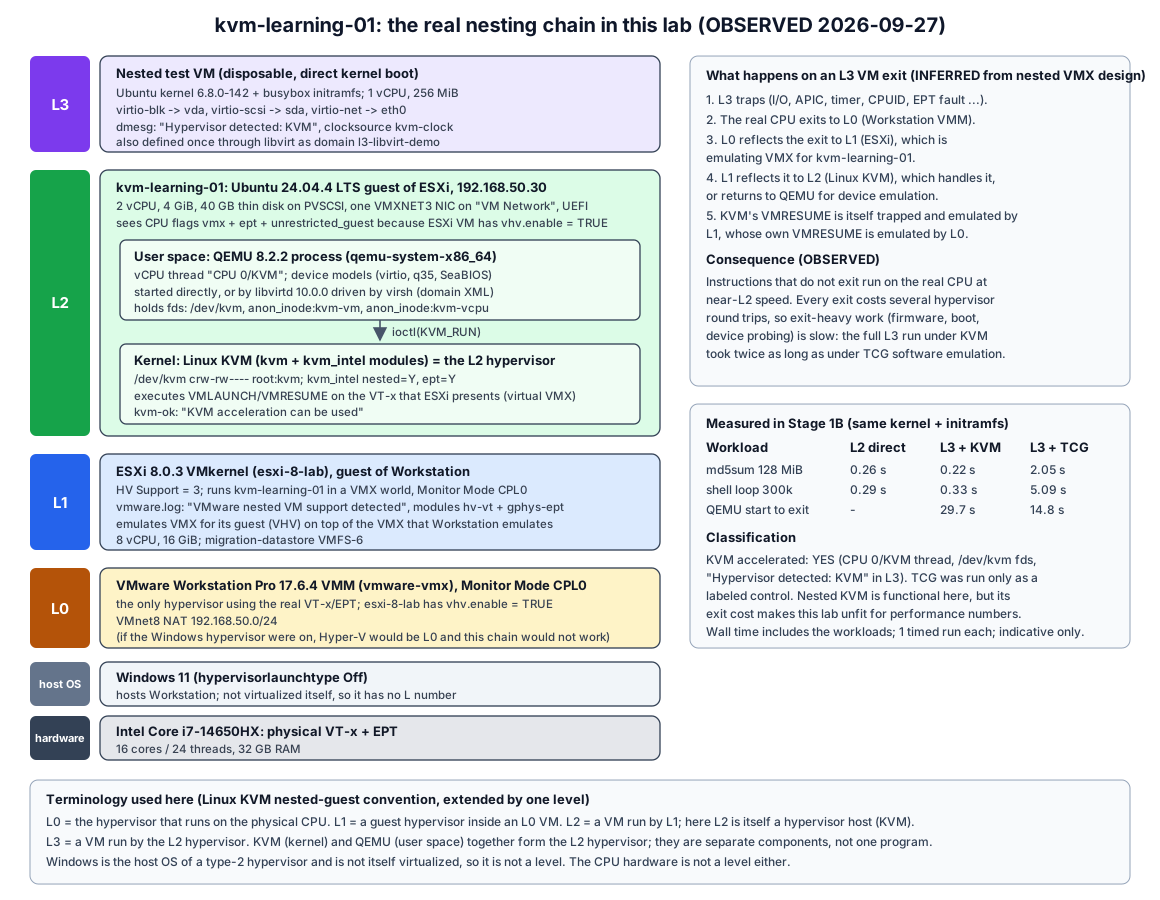
| Diagram | lab-nested-kvm-layers.svg |
Labels: OBSERVED = seen in this lab. INFERRED = reasoned from observations or documentation. NOT TESTED = deliberately not done.
Create one small Linux VM on the prepared ESXi source host. Use it to learn how KVM, QEMU, libvirt and VirtIO fit together, and determine whether nested KVM actually works inside an ESXi guest.
| Allowed and done | Not done (as required) |
|---|---|
Created ONE ESXi guest VM, kvm-learning-01 |
No AWS, Kubernetes, KubeVirt, CDI or migration controller |
Uploaded one ISO to migration-datastore/iso/ (plus temporary seed ISOs, since deleted) |
No Windows virtualization, VMnet, ESXi networking, datastore or host CPU/RAM changes |
| Changed files inside that guest (packages, one password reset, test artifacts) | No snapshots, extra disks, extra NICs or unneeded devices |
| Project documentation and this Git repository | No KVM module parameter changes; no downloads to Windows |
| No change to Stage 0 decisions; no new SSH keys on ESXi or GitHub |
The VM has vhv.enable = "TRUE". This is a per-VM setting of the new guest, not a host CPU change, and without it the nested KVM question cannot be tested.
| Time | Step |
|---|---|
| ~12:20 | ISO candidates hashed; stock Ubuntu 24.04.4 chosen (why) |
| 12:21 | ISO uploaded to migration-datastore/iso/; SHA256 re-checked on ESXi |
| 12:22 | 40 GB thin VMDK created, .vmx written, VM registered (Vmid 1) |
| 12:27:36 | Unattended install confirmed (free license blocks console API; see install method) |
| 12:34:58 | Install finished and powered off |
| 12:35 | First boot: B1 gate passed; baseline and pre-package virtualization checks |
| ~12:40 | sudo password problem fixed via one rescue boot (incident) |
| ~12:46 | Minimal package set installed (34 packages) |
| 12:47 to 12:52 | L3 nested VM runs: direct QEMU with KVM, TCG control, then through libvirt |
| 12:53 to 12:55 | Resource snapshots (L3 running, idle) |
| ~12:58 | Final host, guest and security state checks |
| Gate | Requirement | Result | Evidence (OBSERVED) |
|---|---|---|---|
| B1 | 64-bit Linux boots | PASS | Ubuntu 24.04.4 LTS, uname -m = x86_64, 2 CPUs, 3.8 GiB, 40G disk, VMXNET3 at 192.168.50.30 with gateway, ESXi and internet reachable. Closes Stage 0 N1. |
| B2 | CPU virtualization capability observed | PASS | vmx, ept, vpid, unrestricted_guest flags; lscpu Virtualization: VT-x |
| B3 | /dev/kvm exists or absence explained |
PASS | crw-rw---- root kvm 10, 232 before any package install |
| B4 | KVM module state understood | PASS | kvm_intel + kvm autoloaded; nested=Y, ept=Y; no parameters changed |
| B5 | QEMU installed and tested | PASS | QEMU 8.2.2 (Ubuntu 1:8.2.2+ds-0ubuntu1.18); -accel help lists tcg, kvm; L3 guest booted |
| B6 | KVM acceleration tested | PASS: KVM accelerated | kvm-ok OK; QEMU thread CPU 0/KVM; /dev/kvm + kvm-vm + kvm-vcpu fds; L3 Hypervisor detected: KVM. TCG used only as a labelled control. Caveat: high exit cost at L3. |
| B7 | libvirt / virsh relationship demonstrated | PASS | virsh define / start of l3-libvirt-demo; libvirtd spawned QEMU as libvirt-qemu with -accel kvm, AppArmor enforcing |
| B8 | VirtIO observed and explained | PASS | L2 has 0 VirtIO devices (PVSCSI + VMXNET3). L3 shows virtio-blk (vda), virtio-scsi (sda), virtio-net (eth0), transitional and modern PCI IDs |
| B9 | Nested result recorded | PASS (recorded) | nested-kvm-feasibility.md: functional at L3; CPU-bound near-native, exit-heavy work slow |
| B10 | Resource observations recorded | PASS | Section 9 below: Windows, Workstation, ESXi and Linux views, idle and under L3 load |
B3 and B6 passed on hardware-assisted KVM. No gate relied on software emulation.
KVM is a Linux kernel feature: the modules kvm and kvm_intel (or kvm_amd). It turns the Linux kernel into a hypervisor. It exposes the character device /dev/kvm, and a program uses ioctl() calls on it to:
KVM_CREATE_VM, which returns an anon_inode:kvm-vm fd);KVM_CREATE_VCPU, which returns anon_inode:kvm-vcpu:N fds);KVM_RUN).KVM uses VT-x to enter the guest (VMLAUNCH/VMRESUME) and handles the VM exits it can deal with in the kernel. It emulates no disks, NICs or firmware. See the KVM API.
QEMU is a normal user-space program (qemu-system-x86_64). It is the VMM and device model. It:
They are separate projects and separate components. QEMU can run without KVM (TCG). KVM does nothing without a user-space VMM such as QEMU, and in KubeVirt it is still QEMU, inside a Pod.
| Concept | What it is here | How it was seen |
|---|---|---|
| QEMU process | One Linux process per VM: qemu-system-x86_64 |
ps in L2: PID, RSS ~176 MB for a 256 MiB guest |
| vCPU | One host thread per virtual CPU, named CPU <n>/KVM (or CPU <n>/TCG) |
/proc/<pid>/task/*/comm with -name ...,debug-threads=on |
| Virtual (guest physical) memory | Anonymous memory mapped in the QEMU process and registered with KVM as guest-physical RAM. Pages become resident only when touched | -m 256; L3 MemTotal 211,564 kB (the kernel reserves some); RSS below 256 MiB |
| Disk | A backend file (qcow2 here) plus a frontend device model (virtio-blk, or virtio-scsi + scsi-hd) | -drive/-blockdev + -device; L3 sees vda and sda |
| NIC | A backend (-netdev user, i.e. QEMU’s built-in user-mode NAT) plus a frontend (virtio-net-pci) |
L3 eth0, driver virtio_net |
| Machine model | The emulated chipset and board: q35 (ICH9, PCIe) or pc (i440FX). Ubuntu ships versioned aliases, for example pc-q35-noble |
-machine q35; libvirt chose pc-q35-noble |
| Accelerator | How guest code runs: kvm (hardware, through /dev/kvm) or tcg (software translation) |
-accel kvm versus -accel tcg |
| QEMU only (TCG) | QEMU + KVM | |
|---|---|---|
| Who executes guest instructions | QEMU translates blocks of guest code into host code in software | The real CPU runs guest code directly in VT-x non-root mode |
Needs /dev/kvm / VT-x |
No | Yes |
| vCPU thread | CPU 0/TCG |
CPU 0/KVM (a loop around ioctl(KVM_RUN)) |
| Guest sees | -cpu max emulated model; no vmx; no KVM detection |
-cpu host; Hypervisor detected: KVM; kvm-clock |
| CPU-bound speed at L3 | 2.05 s (md5sum), 5.09 s (loop) |
0.22 s, 0.33 s (L2 itself: 0.26 s, 0.29 s) |
| Device emulation | QEMU | still QEMU (KVM only handles CPU, memory and a few in-kernel devices) |
/dev/kvm, creates a VM and one vCPU fd per vCPU, and registers guest RAM regions.ioctl(vcpu_fd, KVM_RUN). KVM loads the vCPU state into a VMCS and executes VMLAUNCH/VMRESUME. The guest now runs natively.HLT, an EPT fault), the CPU performs a VM exit back to KVM.KVM_RUN to QEMU with an exit reason. QEMU’s device model performs the I/O and calls KVM_RUN again.In this lab step 2 runs on virtual VT-x. The L2 kernel’s VMLAUNCH is trapped by ESXi (L1), which emulates it on top of the virtual VT-x that Workstation (L0) emulates on the real CPU. That is why exits are so expensive here (details).
| Piece | What it is | Observed here |
|---|---|---|
| libvirt | A management API and library that controls hypervisors (QEMU/KVM, Xen, LXC and others) through one model | libvirt 10.0.0 |
libvirtd / virtqemud |
The daemon that owns the VMs: it generates the QEMU command line, starts QEMU, talks to it over QMP, and sets up security labels, cgroups and logging. Newer setups split it into modular daemons (virtqemud and others). Ubuntu 24.04 runs the monolithic libvirtd (libvirt daemons) |
libvirtd.service + virtlogd.service active; no virtqemud |
virsh |
A command-line client of the libvirt API; it does not run VMs itself | virsh version: library 10.0.0, running hypervisor QEMU 8.2.2 |
| Connection URI | Chooses the driver and instance. qemu:///system is the system daemon (root-owned VMs, run as libvirt-qemu); qemu:///session is a per-user instance (URIs) |
virsh uri as labadmin gives qemu:///session; as root, qemu:///system |
| Domain | libvirt’s name for a VM | l3-libvirt-demo |
| Domain XML | The persistent, declarative VM definition: CPU, memory, OS boot, devices (format) | Hand-written, about 30 lines; virsh dumpxml returns the libvirt-expanded version |
Demonstration (OBSERVED), with the same L3 kernel, initramfs and disks as in section 5:
virsh -c qemu:///system list --all showed an empty list.virsh define l3-libvirt-demo.xml registered the domain, state shut off.virsh start l3-libvirt-demo. libvirtd started qemu-system-x86_64 as user libvirt-qemu, under AppArmor profile libvirt-<uuid> (enforcing), with thread CPU 0/KVM and a /dev/kvm fd.on_poweroff=destroy the domain returned to shut off 27.3 s after start.-accel kvm -cpu host,migratable=on, -machine pc-q35-noble-nodefaults, a QMP monitor socket and -sandbox on,...-blockdev storage nodespcie-root-ports plus qemu-xhci and SATA controllers that the XML never asked for (libvirt defaults for q35)VMware analogy: domain XML is like a .vmx; libvirtd is like hostd; virsh is like vim-cmd. The QEMU process is closest to the per-VM VMX process. The analogy is imperfect: ESXi’s VMM runs inside VMkernel, whereas QEMU is an ordinary process on top of the KVM kernel module.
VirtIO is an OASIS-standard family of paravirtual devices (VirtIO 1.2). The guest knows it is virtual and exchanges requests with the hypervisor through shared-memory rings (virtqueues) instead of emulated hardware registers.
| Device | What it is | Guest driver / name | Observed |
|---|---|---|---|
| virtio-blk | One simple block device per PCI function | virtio_blk -> /dev/vdX |
L3 vda, PCI 1af4:1001 (transitional) / 1af4:1042 (modern) |
| virtio-scsi | A SCSI host adapter; disks, CD-ROMs and LUNs appear as SCSI targets behind it | virtio_scsi + sd -> /dev/sdX |
L3 sda behind virtio1/host0/target0:0:0, PCI 1af4:1004 / 1af4:1048 |
| virtio-net | Paravirtual Ethernet NIC | virtio_net -> eth0 / enpXsY |
L3 eth0, PCI 1af4:1000 / 1af4:1041 |
kvm-learning-01 itself has no VirtIO devices, because it runs on ESXi. It uses VMware’s own paravirtual devices (OBSERVED):
| VMware device (in L2) | Nearest VirtIO device (in L3) | Same role | Not identical because | |
|---|---|---|---|---|
| Storage | PVSCSI 15ad:07c0, driver vmw_pvscsi |
virtio-scsi (SCSI HBA). For a plain disk, KubeVirt usually uses virtio-blk | Paravirtual SCSI HBA; disks appear as sdX |
Different PCI vendor/device IDs, different ring and register protocol, different drivers. The guest must have the other driver, and device names can change (sda to vda with virtio-blk) |
| Network | VMXNET3 15ad:07b0, driver vmxnet3 |
virtio-net | Paravirtual NIC with multiqueue | Different device and driver, different MAC vendor prefix (00:0c:29 vs 52:54:00), different interface name (ens192 vs enp1s0/eth0) |
Migration consequence (OBSERVED in this guest, INFERRED for conversion):
/etc/fstab and root= use UUIDs, so they survive the disk bus change.driver: "vmxnet3" and would leave a virtio-net NIC unconfigured.CONFIG_VIRTIO_BLK=y, CONFIG_VIRTIO_NET=y, CONFIG_SCSI_VIRTIO=y).This is exactly the class of fix-ups virt-v2v exists for.
KVM path, as used in this lab:
Linux application (virsh)
  -> libvirt (libvirtd: domain XML -> QEMU command line, QMP, AppArmor, cgroups)
    -> QEMU (user-space process: vCPU threads, guest RAM, virtio device models)
      -> KVM (kernel module: /dev/kvm, ioctl KVM_RUN, VM exit handling)
        -> VT-x (VMLAUNCH/VMRESUME, EPT)
          -> physical CPU
In this lab the VT-x under L2 KVM is virtual. ESXi’s VHV emulates it for kvm-learning-01, on top of the virtual VT-x that Workstation’s VHV emulates for ESXi. Only Workstation touches the real VT-x.
VMware path, as used for kvm-learning-01 itself:
VMware application (vim-cmd / host client -> hostd)
  -> ESXi VMkernel (schedules the VM's VMX world, owns memory and devices)
    -> VMware virtualization (per-VM VMM: hv-vt + gphys-ept modules, Monitor Mode CPL0;
                              PVSCSI / VMXNET3 device emulation in the VMX process)
      -> VT-x / EPT (virtual here, provided by Workstation)
        -> physical CPU
| Role | KVM stack | VMware stack |
|---|---|---|
| Management API and daemon | libvirt / libvirtd | vSphere API / hostd |
| CLI | virsh | vim-cmd, esxcli |
| VM definition | domain XML | .vmx |
| Hypervisor kernel | Linux + KVM module | VMkernel |
| Per-VM user-space process | QEMU | VMX process |
| CPU and memory virtualization | KVM using VT-x/EPT | VMM using VT-x/EPT |
| Paravirtual disk and NIC | virtio-blk / virtio-scsi, virtio-net | PVSCSI, VMXNET3 |
Three different quantities are easy to confuse:
.vmx or QEMU arguments).Idle means after all tests with nothing running in L3. “L3 running” is sampled while the KVM L3 guest was booting. All values OBSERVED.
| Layer (tool) | Configured | Guest-visible | Consumed, idle | Consumed, L3 running |
|---|---|---|---|---|
Windows (perf counters, Get-Process) |
- | 31.7 GiB RAM, 24 logical CPUs | 12.2 GiB free; total CPU 5.0%; vmware-vmx 0.0% CPU, working set 8.43 GiB, private bytes 0.08 GiB |
total CPU 9.0%; vmware-vmx 97.8% |
Workstation (esxi-8-lab.vmx, read-only) |
8 vCPU (1 socket x 8 cores), 16384 MB, vhv.enable = TRUE |
- | - | - |
ESXi host (esxcli hardware memory get, vim-cmd hostsvc/hostsummary) |
- | 16 GiB (17,178,800,128 B), 8 cores @ 2419 MHz | 281 MHz CPU, 3386 MB memory | 1009 MHz, 3401 MB |
ESXi, kvm-learning-01 quickStats (vim-cmd vmsvc/get.summary 1) |
2 vCPU, 4096 MB | - | 209 MHz; guestMemoryUsage 942 MB; hostMemoryUsage 1574 MB; overhead 42 MB; balloon and swap 0 | 940 MHz; guest 1433 MB; host 1574 MB |
Linux L2 (free -m, ps) |
- | 3915 MiB total, 2 CPUs | used 478, buff/cache 830, available 3436 MiB; load 0.19 | used 637 MiB; qemu-system-x86 100% CPU, RSS 182 MB |
| L3 guest | 1 vCPU, 256 MiB | MemTotal 211,564 kB, 1 CPU | - | - |
How to read this:
vmware-vmx working set: only pages ESXi has touched are backed.kvm-learning-01 was given 4096 MB, but ESXi backs 1574 MB (hostMemoryUsage): pages the guest has touched since power-on (install-time and boot-time page cache included).guestMemoryUsage is ESXi’s statistical estimate of recently touched memory, not “used” in the Linux sense. That is why it moves (942 to 1433 MB) while hostMemoryUsage stays at 1574.vmware-vmx at 97.8% means about one of 24 logical CPUs busy. The _Total counter averages over all 24, so the same load shows as 9%.vmware-vmx this is tiny (0.08 GiB private bytes here) because guest RAM is mapped memory, not private heap.vmx, EPT, /dev/kvm, nested=Y./dev/kvm fds and the guest’s hypervisor detection. kvm-ok alone only shows that KVM could be used.RestrictedVersion on screenshot and key injection). Unattended installs need a seed ISO plus a non-interactive confirmation path.match: driver: vmxnet3 does not.Stage 1C has not been defined yet. Following the Stage 0 plan, the natural next step is the actual migration source VM, legacy-source-vm (INFERRED). Stage 1C may begin only when:
legacy-source-vm, the following must be fixed:
migration-datastore/iso/ can be reused);kvm-learning-01 during Stage 1C: keep it running, power it off, or keep it as a conversion-helper candidate. That keeps the nested budget clear.
kvm-learning-01 is configured with 2 vCPU and 4 GB, and ESXi currently backs about 1.6 GB of it.kvm-learning-01.kvm-learning-01), no snapshots;migration-datastore at about 186.5 GB free (200,268,578,816 bytes).