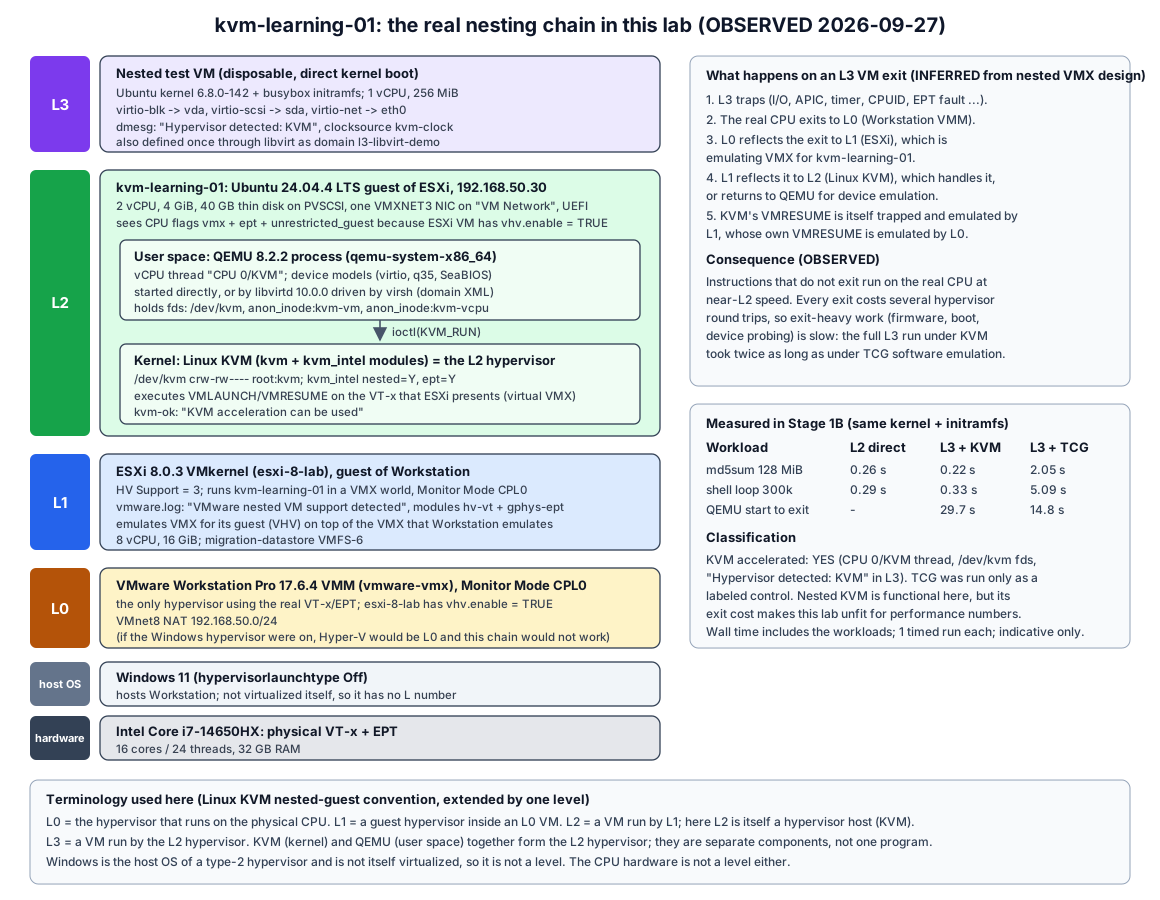
| Field | Value |
|---|---|
| Stage | 1B (KVM / QEMU / VirtIO fundamentals) |
| Date | 2026-09-27 |
| Purpose | One small Linux guest on the ESXi source host, used to learn KVM, QEMU, libvirt and VirtIO, and to test nested KVM |
| Status | Built, validated, powered on at 192.168.50.30 |
| Related | Stage 1B record, nested KVM feasibility, Stage 1 index |
Labels: OBSERVED = seen in this lab on 2026-09-27. INFERRED = reasoned from observations or documentation, not directly tested. NOT TESTED = deliberately not done.
legacy-source-vm. The future migration source VM is a separate Stage 1 deliverable and has not been created.Local ISO candidates were hashed on Windows (Get-FileHash -Algorithm SHA256). Nothing was downloaded.
File (under C:\opentelemetry\Artifacts\) |
Size (bytes) | Date | Verdict |
|---|---|---|---|
ubuntu-24.04.4-live-server-amd64.iso |
3,405,469,696 | 2026-02-27 | Chosen |
ubuntu-24.04-autoinstall.iso |
3,399,235,584 | 2026-07-28 | Rejected |
ubuntu-24.04-pxe-lab-autoinstall.iso |
3,399,225,344 | 2026-08-02 | Rejected |
generated\k8s-ctrl-01-autoinstall.iso |
3,398,828,032 | 2026-08-03 | Rejected |
generated\k8s-worker-01-autoinstall.iso |
3,398,828,032 | 2026-08-03 | Rejected |
generated\k8s-worker-02-autoinstall.iso |
3,398,828,032 | 2026-08-03 | Rejected |
SHA256 (upper-case as printed by Get-FileHash):
E907D92EEEC9DF64163A7E454CBC8D7755E8DDC7ED42F99DBC80C40F1A138433  ubuntu-24.04.4-live-server-amd64.iso
60A6559AB3D1AC7D1C8AE4D942175977C300E533F979FC29EA426A1A6C78C29B  ubuntu-24.04-autoinstall.iso
12DF3D019EC26F1B699CAACB87D6F076D9632566DB93580AB4A199FCA1BC88AE  ubuntu-24.04-pxe-lab-autoinstall.iso
A34B67AA24029EC062DF3017E4E0B9ABD7767689206AB1187C7D819B979C2300  k8s-ctrl-01-autoinstall.iso
B7FD7CA6B1410F22126EEE4ED22A31D11643BD38CBF82F8C8B7FB8926EE7FAF1  k8s-worker-01-autoinstall.iso
CC20164194C148DB6283F222EBBDC7C606861203ACCD73F2B4C97508181F99E8  k8s-worker-02-autoinstall.iso
Why the stock 24.04.4 ISO (OBSERVED):
ubuntu-24.04.4-live-server-amd64.iso in Ubuntu’s official 24.04 SHA256SUMS, so its provenance is verified. The copy uploaded to ESXi was re-hashed on ESXi and matched.updates: security pulled the current kernel anyway (6.8.0-142, see section 6).Created from the ESXi shell (vmkfstools + a hand-written .vmx + vim-cmd solo/registervm), because the free host offers no vCenter and its API is officially unsupported for management.
| Setting | Value | Requested |
|---|---|---|
| Name / Vmid | kvm-learning-01 / 1 |
yes |
| Datastore | migration-datastore (VMFS-6) |
yes |
| Hardware version | vmx-21 | - |
| Guest OS type | ubuntu-64 |
- |
| Firmware | UEFI, Secure Boot off | UEFI |
| vCPU | 2 (1 socket x 2 cores) | 2 |
| Memory | 4096 MB | 4 GB |
| Disk | 40 GB thin VMDK (ddb.thinProvisioned = "1") on PVSCSI |
40 GB thin |
| NIC | 1 x VMXNET3 on VM Network, generated MAC |
1 NIC on VM Network |
| Nested HV | vhv.enable = "TRUE" |
needed for the nested KVM test |
| Other | SVGA (console); floppy off; no CD-ROM after install; no USB, sound, serial or extra controllers | minimal |
| Snapshots | none (vim-cmd vmsvc/snapshot.get 1 empty, .vmsd 0 bytes) |
none |
vhv.enable is the per-VM switch that makes ESXi expose VT-x/EPT to the guest. Without it, /dev/kvm would not appear in the guest. It changes only this VM, not host CPU configuration.
The installer ISO was attached through a temporary SATA CD-ROM during install and rescue and then removed. The final .vmx has no SATA or CD-ROM lines.
The free ESXi license blocks console automation through the API. Both calls below failed with vim.fault.RestrictedVersion (OBSERVED):
CreateScreenshot_Task (console screenshot)PutUsbScanCodes (keyboard injection)The install therefore had to be fully unattended:
CIDATA, holding user-data and meta-data, was built on Windows (IMAPI2FS) and attached as a second CD-ROM. It was deleted from the datastore after use. See cloud-init NoCloud.kvm-learning-01, user labadmin with a SHA-512 password hashstorage.layout: direct, updates: security, shutdown: poweroffgetent passwd labops returns nothing)./screen handler using a local session, and progress was read from the Subiquity status API.Timeline (OBSERVED, UTC): confirmation at 12:27:36. The installer reached UU_RUNNING (security updates) by 12:31:50 and powered off at 12:34:58, about 7.5 minutes. At that point the thin disk had 4,634 MB allocated.
sudo rejected the intended password.openssl passwd -6 -stdin from PowerShell 5.1. That pipe appends a carriage return, so the hash was for “password + CR”. This was proved by recomputing both variants with the same salt; only the CR variant matched.bios.bootOrder = "cdrom") with a rescue seed that had no autoinstall key, so Subiquity waited and did nothing.labadmin hash (usermod -R <mountpoint> -p <hash>). The new hash was generated from a file with no line ending.sudo works. Nothing else in the guest was changed.The real password is stored only in the local lab folder on the laptop, outside Git. No password, hash or key material appears in this repository.
All OBSERVED from uname, lscpu, free, lsblk, ip, lspci and sysfs.
| Item | Value |
|---|---|
| OS | Ubuntu 24.04.4 LTS (Noble Numbat) |
| Kernel | 6.8.0-142-generic (installed by updates: security; the installer ran 6.8.0-100) |
| Architecture | x86_64 (64-bit) |
| Firmware | UEFI (/sys/firmware/efi present) |
| Virtualization seen by guest | systemd-detect-virt = vmware; DMI VMware, Inc. / VMware20,1 |
| CPU | Intel Core i7-14650HX, 2 CPUs (1 socket x 2 cores, 1 thread per core) |
| CPU virt flags | vmx, ept, vpid, unrestricted_guest, plus hypervisor; lscpu: Virtualization: VT-x, Hypervisor vendor: VMware |
| Memory | MemTotal 4,009,372 kB (3.8 GiB; the rest of 4 GiB is firmware/kernel-reserved) |
| Swap | 3.8 GiB swap file /swap.img |
| Disk | sda 40G: sda1 1G vfat /boot/efi, sda2 38.9G ext4 / (6.6G used) |
| Storage controller | VMware PVSCSI 15ad:07c0, driver vmw_pvscsi |
| NIC | VMware VMXNET3 15ad:07b0, driver vmxnet3 1.7.0.0-k-NAPI; name ens192 (altname enp11s0) |
| IP / route | 192.168.50.30/24; default via 192.168.50.2; DNS 192.168.50.2 |
| Reachability | gateway 0.4 ms, ESXi 192.168.50.11 0.25 ms, archive.ubuntu.com 177 ms |
| VirtIO devices | 0 (/sys/bus/virtio/devices empty) |
| VMware integration | open-vm-tools active; vmw_balloon, vmw_vmci, vmwgfx loaded |
Configuration facts that matter for migration later (OBSERVED; INFERRED impact):
| File | Content | Impact on a VMware to KubeVirt conversion |
|---|---|---|
/etc/fstab |
/ and /boot/efi mounted by filesystem UUID |
Survives the change from /dev/sda (PVSCSI) to /dev/vda (virtio-blk). |
| Kernel command line | root=UUID=... |
Same: bus-independent. |
/etc/netplan/50-cloud-init.yaml |
NIC matched by driver: "vmxnet3" |
Breaks on virtio-net: no interface matches, so the VM boots without its static IP. A converter or pre-migration step must rewrite this. |
| Kernel config | CONFIG_VIRTIO_PCI/BLK/NET and CONFIG_SCSI_VIRTIO built in (=y) |
Drivers exist before conversion; no initramfs rebuild is needed for virtio. |
Ubuntu 24.04 uses apt/dpkg. First, apt-get install --simulate compared the dependency set with and without recommends:
--no-install-recommends: 34 packagesThe minimal set was installed with --no-install-recommends.
| Requested package | Installed version | Why it is needed |
|---|---|---|
qemu-system-x86 |
1:8.2.2+ds-0ubuntu1.18 | qemu-system-x86_64, the user-space VMM and device model that creates the VM process and, with -accel kvm, uses /dev/kvm. Pulls in seabios (legacy BIOS firmware for the nested VM) and ipxe-qemu (NIC option ROMs). |
qemu-utils |
1:8.2.2+ds-0ubuntu1.18 | qemu-img, used to create and inspect qcow2 disks. It is the same tool family used later for VMDK to qcow2/raw conversion. |
libvirt-daemon-system |
10.0.0-2ubuntu8.17 | libvirtd with its systemd units, sockets, the libvirt group and the libvirt-qemu user. Pulls in libvirt-daemon-driver-qemu, the QEMU driver. |
libvirt-clients |
10.0.0-2ubuntu8.17 | virsh, the command-line client of the libvirt API. |
cpu-checker |
0.7-1.3build2 | kvm-ok, a quick check that /dev/kvm exists and KVM can be used. |
Not installed, on purpose:
virtinst / virt-install: an XML file is written by hand instead, to learn the format.virt-manager: GUI; not needed.libguestfs-tools: not needed until conversion work.ovmf: the nested test uses direct kernel boot, so it needs no UEFI firmware.bridge-utils, dnsmasq: L3 networking uses QEMU user-mode networking only.After install (OBSERVED):
libvirtd.service and virtlogd.service are active.libvirtd is used; there is no virtqemud modular daemon.labadmin is in the kvm and libvirt groups./dev/kvm is crw-rw---- root:kvm, so members of kvm can run accelerated QEMU without root.| Action | How |
|---|---|
| SSH | ssh labadmin@192.168.50.30 with the existing lab key. A separate known_hosts file under C:\VMs\kvm-learning-01\ is used, so the user’s known_hosts is untouched. |
SSH policy (OBSERVED, sshd -T) |
passwordauthentication no, pubkeyauthentication yes; one authorized key |
| sudo | labadmin password (stored locally only); no NOPASSWD rule (/etc/sudoers.d holds only README) |
| Power (ESXi shell) | vim-cmd vmsvc/power.getstate 1, vim-cmd vmsvc/power.shutdown 1 (graceful, via VMware Tools), vim-cmd vmsvc/power.on 1 |
| libvirt | virsh -c qemu:///system list --all: one domain, l3-libvirt-demo, shut off |
| Nested test artifacts | /tmp/l3/ (disposable, lost on reboot), /var/lib/libvirt/images/l3-demo/ (kept for the libvirt demo) |
| Item | Before Stage 1B | After Stage 1B |
|---|---|---|
| Registered VMs | 0 | 1 (kvm-learning-01, powered on) |
migration-datastore free |
212,962,639,872 B | 200,268,578,816 B |
| VM folder | - | 8.7G (4.6G+ disk data, 4 GB .vswp swap file while powered on, logs) |
iso/ folder |
- | 3.2G (the stock Ubuntu ISO only; seed ISOs deleted) |
| vmk0, port groups, NTP, maintenance mode, HV support | unchanged | unchanged (VM Network now has 1 active client) |
| Snapshots | none | none |
Raw outputs are kept on the laptop in C:\VMs\kvm-learning-01\, outside the repository, because they contain hostnames, MACs, UUIDs and installer secrets. File list:
| # | File | Content |
|---|---|---|
| 01 | 01-create-vm.txt |
vmkfstools, .vmx, registration |
| 02 | 02-install-progress.txt |
installer state polls |
| 03 | 03-final-vm-config.txt |
final .vmx, file list, datastore |
| 04 | 04-guest-baseline.txt |
section 6 commands |
| 05 | 05-esxi-vmwarelog-vhv.txt |
ESXi vmware.log nested-VM lines |
| 06-07 | 06-apt-simulation.txt, 07-apt-install.txt |
package plan, versions, services |
| 08 | 08-rescue-fix.txt |
rescue steps (no secrets) |
| 09-11 | 09-kvm-prep.txt, 10-l3-kvm-test.txt, 11-libvirt-demo.txt |
KVM and QEMU checks, L3 runs, libvirt demo |
| 12-14 | 12-resources-idle.txt, 13-resources-l3-running.txt, 14-resources-idle-final.txt |
resource snapshots |
| 15-16 | 15-esxi-final.txt, 16-guest-identity-config.txt |
final host and guest state |