| Field | Value |
|---|---|
| Project | Project 1.5: VM-to-Kubernetes Migration Platform |
| Stage | 1F |
| Date | 2026-09-27 (all times UTC; work 14:43 to 15:31) |
| Approval | Explicitly approved by the user: create and configure a dedicated Linux VM conversion-host-01, install offline inspection/conversion tooling in it, and copy a working copy of the Stage 1E disk artifact to it for read-only inspection. Not approved: modifying the golden artifact or legacy-source-vm, converting anything, Kubernetes/KubeVirt/CDI, AWS, migration, using kvm-learning-01, Stage 1G. |
| Result | Success (F1 to F10 PASS). conversion-host-01 runs Ubuntu 24.04.5 with qemu-img 8.2.2, libguestfs 1.52.0 and virt-v2v 2.4.0. A byte-identical working copy (sha256 72ca45c7...c9e7) was inspected read-only at container, partition and guest-filesystem level. The golden artifact and the source VM are unchanged. Nothing was converted. |
| Related | Stage 1E record (the golden artifact), Stage 1D record (VMDK layout), Stage 1C record (source baseline), Stage 0 feasibility section 6 (conversion-host options), Stage 1 index |
Labels: OBSERVED = seen in this lab by a command we ran. INFERRED = reasoned from observations or documentation, not directly tested. NOT TESTED = deliberately not done.
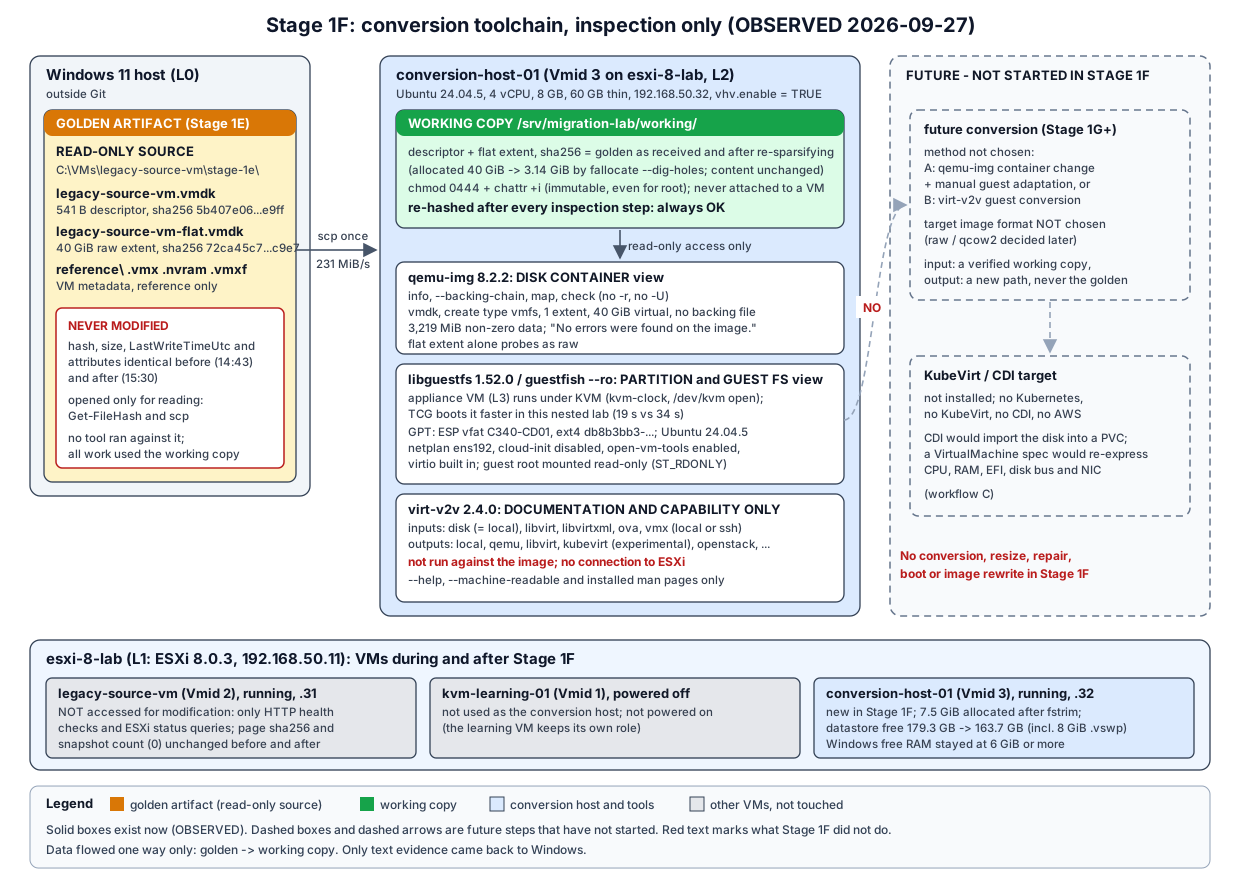
Diagram: stage-1f-conversion-toolchain.svg.
Build a dedicated Linux environment for offline VM disk work, and prove that its toolchain can read the acquired source disk without modifying the golden copy. Specifically:
conversion-host-01 on ESXi, separate from the learning VM and the source VM.This stage is tooling and inspection only. It is not a disk-conversion stage.
| Done | Not done (as required) |
|---|---|
New VM conversion-host-01 (Vmid 3) on migration-datastore, Ubuntu Server 24.04.5 installed unattended from the Stage 1C ISO after re-verification |
No change to legacy-source-vm (no shutdown, snapshot, config or guest change); kvm-learning-01 stayed powered off |
Toolchain investigated with apt-cache/apt-get -s, then installed with --no-install-recommends |
No qemu-img convert, rebase, resize, amend, no filesystem repair, no partition writes, no virt-v2v run that produces output |
Working copy of descriptor + flat extent in /srv/migration-lab/working/, hash-verified, then made read-only and immutable |
Golden artifact in C:\VMs\legacy-source-vm\stage-1e\ only read, never written or re-attributed |
Read-only inspection with qemu-img, fdisk/sfdisk/partx/blkid, libguestfs virt-* tools and guestfish --ro |
No Kubernetes, KubeVirt, CDI, AWS or migration controller; no connection from virt-v2v to ESXi |
fstrim on the conversion host’s own filesystem to return freed space to the datastore |
No ESXi networking, datastore or host configuration change; no new key in ESXi authorized_keys |
virt-v2v against the image or against ESXi, including --print-source.Windows 11 host (L0: VMware Workstation 17.6.4, Windows hypervisor off)
| C:\VMs\legacy-source-vm\stage-1e\ GOLDEN artifact (read only, outside Git)
| | scp (read-only open), 231 MiB/s
+-- esxi-8-lab (L1: ESXi 8.0.3, 192.168.50.11)
+-- legacy-source-vm (Vmid 2, L2, .31) running, NOT accessed by this stage
+-- kvm-learning-01 (Vmid 1, L2, .30) powered off, NOT used
+-- conversion-host-01 (Vmid 3, L2, .32) NEW
/srv/migration-lab/working/ working copy (0444, chattr +i)
qemu-img -> container view (VMDK descriptor + extent)
libguestfs appliance (L3 under KVM) -> partition and guest-filesystem view
virt-v2v -> documentation and capability only
| Item | Requested | Actual (OBSERVED) |
|---|---|---|
| Name / Vmid | conversion-host-01 |
conversion-host-01, Vmid 3, [migration-datastore] conversion-host-01/conversion-host-01.vmx |
| vCPU | 4 | 4 (numvcpus = 4, cpuid.coresPerSocket = 4: one socket) |
| Memory | 8192 MB | 8192 MB (guest sees 7940 MiB) |
| Disk | 60 GB thin, PVSCSI | 60 GiB thin (vmkfstools -c 60G -d thin), scsi0.virtualDev = pvscsi |
| Firmware | UEFI | firmware = efi, Secure Boot off (as for legacy-source-vm) |
| NIC | 1 x VMXNET3 on VM Network | ethernet0.virtualDev = vmxnet3, VM Network, MAC 00:0c:29:58:20:3e, driver vmxnet3 in the guest |
| Hardware version | - | 21 (same as the other two VMs) |
| Nested virtualization | not specified | vhv.enable = TRUE (added deliberately, see below) |
| IP / hostname | 192.168.50.32, conversion-host-01 |
192.168.50.32/24 static, gateway and DNS 192.168.50.2, hostname conversion-host-01 |
| OS | Ubuntu Server 24.04 LTS x86_64, no desktop | Ubuntu 24.04.5 LTS, kernel 6.8.0-142-generic, 0 desktop packages |
| Snapshots / CD-ROM | - | 0 snapshots; both SATA CD-ROMs removed after install |
vhv.enable = TRUE exposes VT-x to this VM so /dev/kvm exists and the libguestfs appliance can use KVM. It is a per-VM setting, the same one kvm-learning-01 uses since Stage 1B. It does not change the ESXi host. Without it, libguestfs would still work, using TCG (software emulation).
| Check | Result |
|---|---|
| Ping 192.168.50.32 from Windows (3 packets) | No reply |
| Windows neighbor table | 00-00-00-00-00-00 Incomplete (no host answered ARP) |
| TCP 22 and 80 from Windows | No answer |
vmkping -c 3 from ESXi |
100% packet loss; ESXi ARP entry (incomplete) |
| VMware DHCP leases / reservations | No lease or reservation for .32; DHCP range is .128 to .254, so .32 is outside it |
| Guest IPs reported by all ESXi VMs | Vmid 1 none (off), Vmid 2 .31 only; no .vmx mentions .32 |
| Workstation running VMs | Only esxi-8-lab |
The address was free, so it was used. The same checks would have stopped the stage if it had been occupied.
| Point in time | Windows free RAM | vmware-vmx working set |
ESXi memory used | Datastore free (bytes) |
|---|---|---|---|---|
| Before creation (14:44) | 10.5 GiB | 10.13 GiB | 2,687 MB | 192,501,776,384 (179.3 GB) |
| During install (14:49 to 14:52) | 6.1 to 6.4 GiB | - | 10,945 to 10,979 MB | - |
| During libguestfs inspection (15:19) | 6.6 GiB | 13.79 GiB | 10,923 MB | 136,233,091,072 (126.9 GB) |
| Final, idle (15:31) | 6.5 GiB | 13.79 GiB | 10,933 MB | 175,781,183,488 (163.7 GB) |
GB = 2^30 bytes here, as in earlier Stage 1 records.
vmware-vmx was at 106% (about one core) in the sample taken during a libguestfs run, and at 15% when idle.scp writes every byte, so the working copy briefly occupied 40 GiB inside the guest, and the thin VMDK grew by that much (free space fell to 126.9 GB). After the copy was re-sparsified in the guest (section 12), fstrim -v / in conversion-host-01 trimmed 46.7 GiB and ESXi reclaimed it: the conversion host’s flat file ended at 7,665 MB allocated. The net cost of Stage 1F is 15.6 GB (16,720,592,896 bytes): the 7.5 GiB thin disk plus an 8 GiB .vswp that exists while the VM runs.legacy-source-vm was unaffected: tools running, about 30 MHz CPU and 841 MB host memory in every sample, the same as before.The Stage 1C verification discipline was repeated. No new ISO was downloaded.
| Check (OBSERVED 14:44) | Result |
|---|---|
Fresh SHA256SUMS + SHA256SUMS.gpg from releases.ubuntu.com/24.04/ |
Identical to the copies verified in Stage 1C |
| Signature | Good signature from "Ubuntu CD Image Automatic Signing Key (2012)", key 843938DF228D22F7B3742BC0D94AA3F0EFE21092 |
| Local ISO sha256 | 97f3d7ffb032c3eb3b23d2c8be9cc76e60c2c1f2c0146ba5ba9fe01cafae0fd8, matches the official line for ubuntu-24.04.5-live-server-amd64.iso |
| Datastore ISO sha256 (on ESXi) | Same value |
Installation (all OBSERVED):
labadmin and its SHA-512 crypt hash were generated on Windows and stored outside Git in C:\VMs\conversion-host-01\. The hash was verified by recomputing it with the same salt. SSH is key-only.user-data) carried the autoinstall configuration: source ubuntu-server (not -minimal, so man pages and standard tools are available for the documentation work), direct storage layout, static ens192 192.168.50.32/24, open-vm-tools, security updates, power off at the end. A live-only user labops gave SSH access to the installer.00:0c:29:58:20:3e, a single 60 GiB disk, 4 CPUs, vmx flag present, autoinstall showing hostname: conversion-host-01..vmx, seed ISO deleted from the datastore, VM powered on (14:52:50).First boot (14:53:45): hostname conversion-host-01, Ubuntu 24.04.5 LTS, kernel 6.8.0-142-generic, systemctl is-system-running = running, 0 failed units, UEFI, sda1 1G ESP + sda2 58.9G ext4, 4 GiB swap file, 698 packages, 0 desktop packages, open-vm-tools 13.0.10 active, sshd on :22, static address and route as configured, and HTTP 200 from the Ubuntu archive.
The distribution, version and architecture were confirmed first: Ubuntu 24.04.5 LTS (noble), x86_64 / amd64, archive in.archive.ubuntu.com (main, restricted, universe, multiverse) plus security.ubuntu.com. Then candidate versions, descriptions and dependencies were read with apt-cache policy/show, and installs were simulated with apt-get -s:
| Simulated set | Without recommends | With recommends |
|---|---|---|
qemu-utils |
2 packages | 14 |
libguestfs-tools |
113 | 289 |
virt-v2v |
108 | 283 |
All of qemu-utils libguestfs-tools guestfs-tools virt-v2v |
119 | 295 |
The 176 extra packages that Recommends would add are mostly GUI, audio, font and graphics libraries (GTK, Mesa, GStreamer, PipeWire, SDL), plus qemu-block-extra, ovmf, virt-p2v and the XFS/ReiserFS/HFS+ libguestfs add-ons. None is needed to inspect this ext4/vfat image. The install therefore used --no-install-recommends.
Findings that shaped the package list:
libguestfs-tools is a meta-package. It depends on guestfish, guestmount and guestfs-tools (which ships virt-inspector, virt-filesystems, virt-df, virt-cat, virt-ls), and it ships libguestfs-test-tool itself.virt-v2v hard-depends on qemu-utils, nbdkit, nbdkit-plugin-python, libnbd-bin and the libguestfs library.qemu-system-x86 and supermin: it runs a small appliance VM.fdisk, sfdisk, partx, blkid, lsblk, parted, file, jq and man were already installed.Installed command (14:55): apt-get install --no-install-recommends qemu-utils libguestfs-tools virt-v2v cpu-checker. Exit 0, 121 packages set up, no errors or warnings.
| Component | Package | Role in this stage | Why it is here |
|---|---|---|---|
qemu-img, qemu-nbd |
qemu-utils |
Read the disk container: format, virtual size, extents, backing chain, allocation map, consistency check | Explicit; required for the container view |
guestfish |
guestfish |
Interactive/scripted shell over the libguestfs API; used with --ro |
Dependency of libguestfs-tools; required for the guestfish findings |
virt-inspector, virt-filesystems, virt-df, virt-cat, virt-ls |
guestfs-tools |
One-shot read-only guest queries | Dependency of libguestfs-tools; required for the libguestfs findings |
virt-tar-out, virt-copy-out |
guestfish |
Copy files out of the guest image (read-only) | Used to grep /etc and read the initramfs |
libguestfs-test-tool |
libguestfs-tools |
Self-test of the appliance; shows the backend and accelerator | Explicit; used for section 10 |
libguestfs library, supermin, qemu-system-x86 |
libguestfs0t64, supermin, qemu-system-x86 |
Build and run the appliance (host kernel + minimal userspace in a small VM) that actually opens the disk | Hard dependencies |
virt-v2v |
virt-v2v |
Documentation and capability listing only | Explicit; installed so the local man pages and capability list are exact for this version. Not required by anything run in this stage |
nbdkit, nbdinfo, libvirt0, osinfo-db |
various | Used internally by virt-v2v and guestfs-tools (NBD disk access, OS database). libvirt0 is only the client library; no libvirt daemon is installed |
Hard dependencies; not used directly |
kvm-ok |
cpu-checker |
Quick KVM usability check | Explicit; optional convenience |
fdisk, sfdisk, partx, blkid |
util-linux, fdisk |
Read-only partition and filesystem probing of the raw extent, without a loop device | Already installed |
jq, sha256sum, lsattr/chattr, fallocate |
preinstalled | Summaries, hashing, immutable flag, re-sparsifying | Already installed |
Pulled in but not used in this stage: guestmount (FUSE mount), sleuthkit, libvmdk1, and the virt-v2v helpers virt-v2v-in-place and virt-v2v-inspector.
Deliberately not installed: ovmf (UEFI firmware for KVM guests; needed only once something boots or virt-v2v writes UEFI metadata), libvirt-daemon-system (the direct backend does not need it), nbdkit-vddk-plugin (needs VMware’s proprietary VDDK), and all Recommends.
OBSERVED with dpkg-query and the tools’ own --version:
| Package | Version | Tool version |
|---|---|---|
qemu-utils |
1:8.2.2+ds-0ubuntu1.18 | qemu-img version 8.2.2 |
qemu-system-x86, qemu-system-common |
1:8.2.2+ds-0ubuntu1.18 | - |
libguestfs0t64, libguestfs-tools, guestfish, guestmount, libguestfs-perl |
1:1.52.0-5ubuntu3 | guestfish 1.52.0 |
guestfs-tools |
1.52.0-2ubuntu5 | virt-inspector 1.52.0 |
virt-v2v |
2.4.0-2build4 | virt-v2v 2.4.0 |
supermin |
5.2.2-4ubuntu4 | supermin 5.2.2 |
nbdkit, nbdkit-plugin-python |
1.36.3-1ubuntu10 | nbdkit 1.36.3 |
libnbd-bin, libnbd0 |
1.20.0-1 | - |
libvirt0 |
10.0.0-2ubuntu8.17 | - |
osinfo-db |
0.20250606-0ubuntu0.24.04.1 | - |
cpu-checker |
0.7-1.3build2 | - |
sleuthkit / libvmdk1 |
4.12.1+dfsg-1.1ubuntu2 / 20200926-2build5 | - |
util-linux, fdisk |
2.39.3-9ubuntu6.6 | - |
parted / file / man-db / coreutils |
3.6-4build1 / 1:5.45-3build1 / 2.12.0-4build2 / 9.4-3ubuntu6.3 | - |
open-vm-tools (host itself) |
2:13.0.10-0ubuntu0.24.04.1 | - |
qemu-utils comes from noble-updates. The libguestfs, guestfs-tools, virt-v2v, nbdkit and supermin packages come from noble/universe, so they receive community rather than Canonical main support.
| Check | Result |
|---|---|
| CPU | Intel Core i7-14650HX as seen through two hypervisors; lscpu: Virtualization VT-x, Hypervisor vendor VMware |
vmx flag |
Present on all 4 vCPUs; vmx flags include ept, vpid, unrestricted_guest, ept_ad |
| Modules | kvm_intel and kvm loaded automatically |
kvm_intel parameters (read only, not changed) |
nested=Y, ept=Y, unrestricted_guest=Y, enable_apicv=N |
/dev/kvm |
crw-rw---- root kvm 10,232; labadmin is not in group kvm |
kvm-ok |
“KVM acceleration can be used” |
No kernel module parameter or group membership was changed. All libguestfs commands ran as root through sudo, for two reasons: /dev/kvm is group kvm, and Ubuntu’s /boot/vmlinuz-* is mode 0600, while supermin must read the host kernel to build the appliance.
libguestfs-test-tool was run three times (backend direct, the library default here):
| Run | Accelerator requested by libguestfs | Appliance kernel says | Wall time | Result |
|---|---|---|---|---|
| First (builds the supermin appliance) | accel=kvm:tcg |
Hypervisor detected: KVM; clocksource kvm-clock |
36.9 s | TEST FINISHED OK |
Second (appliance cached, 403 MB in /var/tmp/.guestfs-0) |
accel=kvm:tcg |
Hypervisor detected: KVM; clocksource kvm-clock |
34.3 s | TEST FINISHED OK |
LIBGUESTFS_BACKEND_SETTINGS=force_tcg |
accel=tcg |
Booting paravirtualized kernel on bare hardware; clocksource tsc-early |
19.3 s | TEST FINISHED OK |
During a further run, the live qemu-system-x86_64 process had accel=kvm:tcg on its command line and an open file descriptor on /dev/kvm.
Conclusions:
accel=kvm:tcg means “KVM if possible, else TCG”, and three independent signs (appliance kernel message, clocksource, open /dev/kvm) show KVM was used rather than the fallback.So “libguestfs works” and “KVM acceleration works” are separate facts, and neither implies “KVM is faster here”. No setting was changed: all later runs used the default (KVM). force_tcg is an option to evaluate if Stage 1G runs many short libguestfs operations. A long, I/O-heavy conversion might behave differently. NOT TESTED.
Rules applied:
C:\VMs\legacy-source-vm\stage-1e\ were opened only for reading: by Get-FileHash (before and after), by the aborted ssh stream and a 2 GiB throughput probe (both read through a cmd input redirection), and by scp (section 12).Before (14:43) and after (15:30), OBSERVED on Windows:
| File | sha256 | Bytes | LastWriteTimeUtc | Attributes | Before = after |
|---|---|---|---|---|---|
legacy-source-vm-flat.vmdk |
72ca45c7bcb2fc617e53f6286832d6d53d74e9801a18fb295c5fb88de1f9c9e7 |
42,949,672,960 | 2026-09-27T14:20:09.0410349Z | Archive | Yes |
legacy-source-vm.vmdk |
5b407e06ec29cac925a4504978ca3cef5d231398536ab476bcd03acbdc5de9ff |
541 | 2026-09-27T14:15:32.6800994Z | Archive | Yes |
reference\legacy-source-vm.vmx |
f3af99e36cbd2dadef8cd55685fd3e5cb4570fc2632729b5bc4f8efd700fb0db |
2,456 | 2026-09-27T14:15:31.6652396Z | - | Yes |
reference\legacy-source-vm.nvram |
e99a76ebba91d6e2af591b0cb0909ccea6462f6aa5753125fc142ac8e6b72646 |
270,840 | 2026-09-27T14:15:32.0057560Z | - | Yes |
reference\legacy-source-vm.vmxf |
2905a1b9ca9bdc633f432ef26904e11b43e1e9babad0378037617053d89ae4ab |
47 | 2026-09-27T14:15:32.3296520Z | - | Yes |
These are the Stage 1E values. The golden artifact is intact and unmodified.
Source VM health, OBSERVED before (14:43) and after (15:30): Powered on, 0 snapshots, tools running, 192.168.50.31, HTTP 200 with 267 bytes and page sha256 b9826e18a06a354d6ba97e3419e266b1453cb2a3b0038d4b3dcd45c96c170046 from both Windows and ESXi. Nothing in this stage connected to legacy-source-vm except these HTTP checks and ESXi status queries.
| Step | Time | Detail (OBSERVED) |
|---|---|---|
| Directory | 14:58 | /srv/migration-lab/{working,evidence}, owner labadmin, 0755; 50.8 GB free on / |
| Descriptor | 14:58 | scp of legacy-source-vm.vmdk (541 bytes) |
| Flat extent, first attempt | 14:58 to 15:00 | ssh -C ... "dd of=... conv=sparse" fed from the golden file by cmd redirection. Only about 12 MB/s: the Windows ssh.exe client was pinned at one full core. Stopped; the partial destination file was deleted. An uncompressed probe (2 GiB to /dev/null) reached only 22.6 MB/s, so the Windows OpenSSH stdin path itself is the bottleneck. |
| Flat extent | 15:01:55 to 15:04:52 | scp of legacy-source-vm-flat.vmdk: 42,949,672,960 bytes in 177 s (about 231 MiB/s), exit 0. The same mechanism Stage 1E used in the opposite direction. |
| Verify as received | 15:05 | Size 42,949,672,960. sha256 72ca45c7...c9e7 (54 s) = golden. Descriptor sha256 5b407e06...e9ff = golden. |
| Re-sparsify | 15:06 | scp writes every byte, so the copy was fully allocated (40 GiB). fallocate --dig-holes deallocated all-zero blocks: 3,376,066,560 bytes allocated afterwards, apparent size unchanged. |
| Verify again | 15:06 | sha256 72ca45c7...c9e7 again: re-sparsifying changed allocation only, not content. |
| Structure | 15:06 | Descriptor text identical to Stage 1D/1E (CID=7475b330, parentCID=ffffffff, createType="vmfs", RW 83886080 VMFS "legacy-source-vm-flat.vmdk"). 83,886,080 sectors x 512 = 42,949,672,960 = flat file size. |
| Lock | 15:07 | chmod 0444 on both files, then chattr +i (immutable, which blocks writes even by root). A zero-byte append test as root returned “Operation not permitted”. Hashes written to /srv/migration-lab/evidence/working-copy.sha256. |
| Re-verify | after every step | sha256sum -c of the manifest after qemu-img, partition probing, libguestfs, guestfish and the /etc extraction, and at 15:30: always OK. |
Mechanism summary: SCP over the existing key-based SSH (labadmin, Windows key); destination /srv/migration-lab/working/; verification by full sha256 on both sides. No credentials are stored in the repository. The only credentials created are the console password and hash for conversion-host-01, kept in C:\VMs\conversion-host-01\.
Safety rule applied: qemu-img’s documentation warns against using images that are in use by a running VM. Before inspection, fuser showed no process holding the working files, and no qemu-system process was running. The image was never attached to a VM. -U (force-share) was not used. check ran without -r, so it repaired nothing.
| Question | Command | Answer (OBSERVED) |
|---|---|---|
| Version | qemu-img --version |
8.2.2 (Debian 1:8.2.2+ds-0ubuntu1.18) |
| Formats this build knows | qemu-img --help |
Includes vmdk, raw, qcow2, qcow, vdi, vhdx, vpc, qed, parallels, dmg, bochs, cloop, luks, plus protocols (file, nbd, ssh, http(s), iscsi, rbd, nfs, gluster) |
| Format | qemu-img info legacy-source-vm.vmdk |
vmdk, create type: vmfs, one extent legacy-source-vm-flat.vmdk of format VMFS |
| Virtual size | same | 40 GiB (42,949,672,960 bytes) |
| Allocated size | same, and --output=json |
3.14 GiB (actual-size 3,376,070,656 = extent 3,376,066,560 + descriptor 4,096). This is the working copy’s allocation after re-sparsifying, not VMFS’s. |
| Descriptor IDs | same | cid: 1953870640 (= 0x7475b330), parent cid: 4294967295 (= 0xffffffff, no parent) |
| Backing file | qemu-img info --backing-chain |
None; the chain has exactly one image. dirty-flag: false |
| Flat extent alone | qemu-img info legacy-source-vm-flat.vmdk |
Probed as raw, 40 GiB: the extent is plain sectors with no header |
| Sparse characteristics | qemu-img map --output=json |
4,223 extents: 2,112 non-zero extents totalling 3,376,021,504 bytes (3,219 MiB), and 2,111 zero extents totalling 39,573,651,456 bytes. The first data is at offset 0 (protective MBR and GPT) and data extends to the last sector (backup GPT). |
| Consistency | qemu-img check legacy-source-vm.vmdk |
“No errors were found on the image.”, exit 0 |
Interpretation:
fallocate --dig-holes. That is a content-based view: 3,219 MiB of non-zero data. It is consistent with, but not the same as, VMFS’s 3,487 x 1 MiB allocated blocks from Stage 1D, whose blocks are coarser and can contain zeros.qemu-img check is weak evidence: it confirms the descriptor and extent are coherent, not that the guest filesystem is healthy (INFERRED from the format). Guest-level health was not checked (no fsck, section 20).libguestfs reads the same bytes one layer up: it boots its appliance with the image attached as a disk and uses real Linux kernel drivers to read partitions and filesystems. It never boots the guest’s own OS. All tools ran with --format=vmdk against the descriptor, so qemu inside the appliance followed the extent reference. virt-filesystems, virt-df, virt-inspector, virt-cat, virt-ls, virt-tar-out and virt-copy-out are read-only by design.
Host-level versus guest-level view. Partition probing (fdisk -l, sfdisk --json, partx --show, and blkid -p with byte offsets) reads the raw extent as a file on the conversion host. It sees only the partition table and filesystem superblocks. libguestfs mounts the filesystems inside the appliance and reads files. Both views agree:
| Item | Host-level probing of the flat extent | libguestfs view |
|---|---|---|
| Partition table | GPT, disk id EBEB0EBF-F2F7-4507-B842-6DB77A2D14A1, usable LBA 34 to 83,886,046; protective MBR type 0xee (file) |
part-get-parttype = gpt |
| Partition 1 | Sectors 2,048 to 2,203,647 (1 GiB), type C12A7328-F81F-11D2-BA4B-00A0C93EC93B (EFI System), PARTUUID 408D91CB-0067-4B02-860A-3AAAFC305364 |
/dev/sda1 vfat, UUID C340-CD01, mounted at /boot/efi by inspection |
| Partition 2 | Sectors 2,203,648 to 83,884,031 (38.9 GiB), type 0FC63DAF-8483-4772-8E79-3D69D8477DE4 (Linux filesystem), PARTUUID B701FE8C-F9FD-4FB2-A54B-CA0AFEDB63CE |
/dev/sda2 ext4, UUID db8b3bb3-e776-42e8-902e-89124606b2f6, root filesystem |
| Filesystems | blkid -p: FAT32 C340-CD01; ext4 1.0 db8b3bb3-...b2f6; no labels |
virt-filesystems: the same; no LVM, no labels |
| Used space | not visible | virt-df: ESP 6.1M of 1.0G; root 6.1G of 38G (17%) |
| OS identity | not visible | virt-inspector: linux / ubuntu / “Ubuntu 24.04.5 LTS”, version 24.4, x86_64, deb/apt, hostname legacy-source-vm, osinfo ubuntu24.04, root /dev/sda2, 500 installed applications |
These match the Stage 1C baseline: the same partition GUIDs, PARTUUIDs, FS UUIDs and 500 packages.
Guest files read with virt-cat/virt-ls (OBSERVED; only non-secret configuration was read):
/etc/os-release: PRETTY_NAME="Ubuntu 24.04.5 LTS", VERSION_CODENAME=noble./etc/hostname: legacy-source-vm; /etc/hosts: 127.0.1.1 legacy-source-vm./etc/fstab: / and /boot/efi by /dev/disk/by-uuid/..., swap by path /swap.img./etc/netplan/: one file, 50-cloud-init.yaml (mode 0600), ethernets: ens192, dhcp4: false, 192.168.50.31/24, default route and DNS 192.168.50.2.sites-enabled/default is a symlink to sites-available/default, which has listen 80 default_server, listen [::]:80 default_server, root /var/www/html. /var/www/html/index.html is 267 bytes, the validation page.Issues met: the first libguestfs run failed immediately because these tools require --format before -a. The tools exited before opening the image, and the manifest check stayed OK.
guestfish was used in two modes, to show the difference between the block-device layer and the guest-filesystem layer.
guestfish --ro -a ... with run, no mounts (block-device view):
list-devices: /dev/sda; list-partitions: /dev/sda1, /dev/sda2; blockdev-getsize64 /dev/sda = 42,949,672,960.part-list: partition 1 from byte 1,048,576, size 1,127,219,200; partition 2 from byte 1,128,267,776, size 41,820,356,608.part-get-gpt-type: C12A7328-... and 0FC63DAF-...; vfs-type/vfs-uuid: vfat C340-CD01, ext4 db8b3bb3-...b2f6; vfs-label: empty for both.guestfish --ro -i (inspection-driven mounts, guest-filesystem view):
inspect-get-roots = /dev/sda2; type linux, distro ubuntu, product “Ubuntu 24.04.5 LTS”, hostname legacy-source-vm, package format deb.mountpoints: /dev/sda2 on /, /dev/sda1 on /boot/efi, taken from the guest’s own fstab.statvfs / returned flag: 4097 = ST_RDONLY (1) + ST_RELATIME (4096): the guest root was mounted read-only inside the appliance. The appliance’s df-h showed the guest at /sysroot (39G, 6.2G used) and its own 4.0G root separately.EFI/BOOT/ holds BOOTX64.EFI, fbx64.efi, mmx64.efi. EFI/ubuntu/ holds shimx64.efi, grubx64.efi, mmx64.efi, grub.cfg, BOOTX64.CSV./boot: vmlinuz-6.8.0-142-generic and initrd.img-6.8.0-142-generic (75,988,137 bytes)./boot/grub/grub.cfg: every search line is --fs-uuid --set=root db8b3bb3-...b2f6 (with --hint-bios/--hint-efi=hd0,gpt2 hints). /etc/default/grub: GRUB_CMDLINE_LINUX="" and GRUB_CMDLINE_LINUX_DEFAULT=""./etc/machine-id is 33 bytes (32 hex characters plus newline). The value was not recorded./etc/cloud/cloud-init.disabled exists; /var/lib/cloud/instances/ contains iid-datasource-none.multi-user.target.wants/open-vm-tools.service is a symlink (enabled)./boot/config-6.8.0-142-generic): CONFIG_VIRTIO_BLK=y, CONFIG_SCSI_VIRTIO=y, CONFIG_VIRTIO_NET=y, CONFIG_VIRTIO_PCI=y, CONFIG_VMWARE_PVSCSI=m, CONFIG_VMXNET3=m, CONFIG_FW_CFG_SYSFS=m.A second read-only pass extracted the guest’s /etc with virt-tar-out into a root-only temporary directory on the conversion host for grep. That directory was deleted afterwards (verified). It also copied the newest initramfs out with virt-copy-out and listed it with lsinitramfs. The initramfs (MODULES=most) contains vmw_pvscsi, vmxnet3, ahci and nvme. virtio block and net need no modules there because they are built into the kernel.
Sources: virt-v2v --version, --machine-readable, --help and the installed man pages virt-v2v(1), virt-v2v-input-vmware(1), virt-v2v-output-local(1) and virt-v2v-support(1) for version 2.4.0. No virt-v2v run touched the image or ESXi.
| Question | Answer (from the installed version’s own output and docs) |
|---|---|
| Input modes | -i disk, -i libvirt (the default), -i libvirtxml, -i ova, -i vmx. -i local is documented as the same as -i disk. |
-i disk |
Reads a single disk image with no metadata, and guesses defaults for memory, vCPUs and so on. Only single-disk guests. Finer control needs -i libvirtxml. |
-i vmx |
Reads a VMware .vmx directly (local path or NFS) or over SSH (-it ssh with ssh://root@esxi/vmfs/volumes/...), and uses it to find the .vmdk disks. The guest must be shut down; virt-v2v cannot detect concurrent access in this mode. The SSH transport is not usable if the guest has snapshots. |
| Expected source metadata | For -i vmx: a folder with guest.vmx, guest.vmxf, guest.nvram and one or more .vmdk. For -i disk: none. |
| Can our VMX + VMDK be consumed? | INFERRED yes: Stage 1E kept exactly that set (reference\*.vmx, .vmxf, .nvram + descriptor + flat), and the .vmx names the descriptor by relative path. A -i vmx run would need a working copy of the .vmx next to the working VMDK. NOT TESTED. |
| Other VMware input | -ic vpx://... for vCenter over HTTPS (capability vcenter-https), -it vddk with VMware’s proprietary VDDK library (capability vddk; nbdkit-vddk-plugin not installed), and -i ova. Free ESXi without vCenter leaves -i vmx (local or SSH) as the realistic path. |
| SSH VMware input | Needs passwordless root SSH from the conversion host to ESXi (ssh-agent, or a key in ESXi’s authorized_keys), or the incomplete -ip passwordfile. Stage constraints forbid adding keys to ESXi, and the source would have to be powered off. Not used. |
| Output modes | glance, kubevirt, libvirt, local, null, openstack, qemu, rhv, rhv-upload, vdsm; output format -of raw or qcow2; allocation -oa sparse or preallocated. |
-o kubevirt |
Present in 2.4.0 and documented as experimental, will change. It writes the converted disks to -os /dir as /dir/name-sda, and so on, plus metadata in /dir/name.yaml. It does not talk to a cluster. |
-o local / -o qemu |
Disks plus libvirt XML (local) or a QEMU start script (qemu) in a directory. |
| Guest transformations | The man page states that virt-v2v “can modify the guest to make it bootable on KVM and install virtio drivers”. It runs a non-destructive fstrim on an overlay above the guest data; the page notes that VFAT filesystems, as used for UEFI ESPs, cannot be trimmed. For Debian/Ubuntu with GRUB 2 it cannot set the default kernel. The exact changes it would make to this guest are not listed in the pages consulted and were not observed: not yet determined. |
| Supported guests | virt-v2v-support: “Ubuntu 10.04, 12.04, 14.04, 16.04, and up”. UEFI guests can be converted if the target supports UEFI; for libvirt output, the same OVMF version must be installed on the conversion host as on the target. ovmf is not installed here. |
| Other helpers present | --print-source (print the parsed source and stop), virt-v2v-in-place, virt-v2v-inspector. None was run. |
Recorded, not fixed. The source for each item is the working copy (sections 14 and 15); nothing was read from the running source VM.
Confirmed present
| Item | Finding | Why it matters |
|---|---|---|
netplan keyed on ens192 |
/etc/netplan/50-cloud-init.yaml: ethernets: ens192, static 192.168.50.31/24, route and DNS .2 |
A virtio NIC gets another name, for example enp1s0, and no configuration (Stage 1C high risk) |
ens192 also in the cloud-init installer config |
/etc/cloud/cloud.cfg.d/90-installer-network.cfg |
A second place to change if the name is adapted |
| cloud-init installed but disabled | cloud-init 26.1; /etc/cloud/cloud-init.disabled present; instance iid-datasource-none; the datasource_list still includes NoCloud, ConfigDrive, VMware and others |
If the marker is removed or a datasource is injected, cloud-init could rewrite network config, SSH keys or the hostname |
| VMware Tools | open-vm-tools 13.0.10 installed and enabled; /etc/vmware-tools/ present (tools.conf, vgauth.conf, power scripts) |
Useless on KubeVirt; virt-v2v normally removes it (INFERRED) |
| Filesystem-UUID mounts | fstab / and /boot/efi by /dev/disk/by-uuid; swap by path /swap.img |
Survives the disk-name change /dev/sda to /dev/vda |
| UEFI bootloader | ESP with EFI/BOOT/BOOTX64.EFI (fallback), fbx64.efi, EFI/ubuntu/shimx64.efi, grubx64.efi, BOOTX64.CSV; signed shim 15.8 and GRUB 2.12; GRUB finds root by FS UUID |
A fresh UEFI variable store on the target must boot through the fallback path. The VMware .nvram is not part of the disk. |
| machine-id | Present, 33 bytes (value not recorded) | Must stay the same for identity comparison, unless a policy regenerates it |
| SSH host keys | ecdsa, ed25519, rsa public keys present | Identity evidence after migration; clients will warn if they change |
| nginx | 1.24.0, default site on :80 and [::]:80, 267-byte page | The application-level acceptance check |
| Paravirtual drivers | virtio-blk, virtio-scsi, virtio-net and virtio-pci built in (=y); vmw_pvscsi and vmxnet3 are modules, also in the initramfs |
No initramfs rebuild should be needed for virtio (INFERRED) |
Confirmed absent
| Item | Finding |
|---|---|
vmxnet3 references in /etc |
None |
pvscsi references in /etc |
None |
MAC pinning (macaddress, udev ATTR{address}, networkd MACAddress=) |
None |
/dev/sda device paths in fstab |
None (all by UUID) |
| LVM, filesystem labels | None |
| qemu-guest-agent | Not installed |
Not yet determined (needs a boot, a conversion or a target, all out of scope)
fsck, not even a read-only -n check, was run in this stage.Three distinct workflows. None was used in this stage.
| Workflow A: manual artifact pipeline | Workflow B: virt-v2v | Workflow C: future KubeVirt/CDI import | |
|---|---|---|---|
| What moves | Disk bytes only | Disk bytes plus derived VM metadata | Disk bytes into a PVC; VM definition written separately |
| Container step | qemu-img convert (VMDK to raw or qcow2) or, for a flat extent, the raw bytes as they are (INFERRED) |
Internal, output with -of raw or qcow2 |
CDI converts supported formats to raw on the PVC |
| Guest adaptation | Manual and optional (for example libguestfs virt-customize, or target-side config) |
Automatic: virtio enablement, boot fixes, tool removal (INFERRED from docs) | None by CDI itself; the guest must already be KVM-ready, or adapted before import |
| VM metadata | Written by hand from the .vmx facts |
Generated (-o local XML, -o kubevirt YAML, and so on) |
KubeVirt VirtualMachine spec, written or generated |
| Input used | The acquired descriptor + flat extent | -i disk (image only) or -i vmx (.vmx + .vmdk), cold |
An HTTP, S3, upload or registry source, or VDDK against vCenter |
| Strength | Transparent, each step verifiable | Knows guest-OS internals, fewer manual steps | Kubernetes-native, declarative |
| Risk | Easy to forget a guest change (the netplan ens192 issue) |
Opaque changes; -o kubevirt is experimental |
Needs a cluster; format and PVC sizing decisions |
qemu-img alone is not a migration tool. It changes the container, never the guest inside it: after qemu-img convert, the guest still expects a VMware NIC name and still runs VMware Tools. virt-v2v is a guest converter that also converts the container. CDI is an importer. Industry tools such as MTV/Forklift run virt-v2v inside a conversion pod and then import with CDI: in effect, B feeding C.
-i vmx parses the reference .vmx (not run).fsck).Stage 1G is not defined here. It may begin only when:
conversion-host-01 is operational: running, reachable at 192.168.50.32, toolchain versions as in section 9.72ca45c7bcb2fc617e53f6286832d6d53d74e9801a18fb295c5fb88de1f9c9e7 and the descriptor to 5b407e06...e9ff, with unchanged size and timestamps.C:\VMs\conversion-host-01\, and the guest filesystem is readable (sections 14 and 15).legacy-source-vm remains healthy (HTTP 200, page sha256 b9826e18...0046), unchanged and not snapshotted.| Gate | Evidence | Result |
|---|---|---|
| F1 Repository / Stage 1E state verified | main = origin/main = a4802f3e83d940e5331b817790a9680c4aa67955, working tree clean, git ls-remote agrees |
PASS |
| F2 Source VM health verified | Vmid 2 powered on, 0 snapshots, tools running, .31, HTTP 200 + page sha256 from Windows and ESXi, before and after (section 11) | PASS |
| F3 Golden artifact protected | Five files: hash, size, LastWriteTimeUtc and attributes identical before and after; only read (section 11) | PASS |
| F4 conversion-host-01 created | Vmid 3, 4 vCPU, 8192 MB, 60 GB thin, EFI, PVSCSI, VMXNET3, .32 verified free first (section 5) | PASS |
| F5 Ubuntu Server operational | Verified ISO; unattended install; first boot running, 0 failed units, no desktop (section 7) |
PASS |
| F6 Toolchain installed and versions recorded | Investigation, then minimal install, exit 0; versions in section 9 | PASS |
| F7 KVM/libguestfs capability characterized | /dev/kvm, nested=Y, kvm-ok; test-tool KVM vs force_tcg with evidence of which accelerator ran (section 10) |
PASS |
| F8 Working VMDK copied and hashes verified | sha256 identical as received and after re-sparsifying; descriptor identical; extent size matches; read-only + immutable (section 12) | PASS |
| F9 Read-only disk/guest inspection completed | qemu-img, partition probing, libguestfs, guestfish, virt-v2v docs; working copy hash unchanged after each (sections 13 to 17) | PASS |
| F10 Documentation/diagram complete | This record, stage-1f-conversion-toolchain.svg, Stage 1 index, root README, glossary and interview notes updated | PASS |
conversion-host-01: qemu-img --help; virt-v2v --help and --machine-readable; man pages virt-v2v(1), virt-v2v-input-vmware(1), virt-v2v-output-local(1) and virt-v2v-support(1) (virt-v2v 2.4.0); libguestfs-test-tool output (libguestfs 1.52.0).apt-cache policy/show against the noble archive, 2026-09-27.C:\VMs\conversion-host-01\ (01 to 23 evidence files, installer seed template, VM definition and inspection scripts).